一时心血来潮对棋类博弈产生了兴趣,就想着通过实现一个五子棋AI顺便了解一下相关算法和知识。
五子棋在英文中又称Gobang。先简单介绍一下,由于五子棋已经被机器严格证明了是一种“不公平”的游戏,先手黑子是绝对占优的,并且先手有必胜的套路。由于先手必胜,必须对先手进行一定的规则限制,于是就出现了“禁手”一说,即某些位置(比如能形成双活3、活3冲4) ](https://baike.baidu.com/item/五子棋/130266))黑子不能下,不然就算黑子输。在日本,五子棋的理论得到极大发展,有禁手规则的五子棋被称为“连珠”(renju),而一般无禁手规则的叫做gomoku。由于大部分普通人下五子棋只是图一个乐趣,并不需要深入研究其中的理论规则,所以反而是gomoku在学生之间非常流行(我高中时下课就经常和同学玩五子棋)。
这里我实现的五子棋AI是无禁手规则的(因为有禁手的太复杂,另外本人比较懒。。。),标准棋盘大小为15$\times$15,我的目的是想实现一个能打败大部分普通人的AI,因此并没有进行更深入的专业性研究。所以,如果你能战胜我实现的AI,也不用太过惊讶。
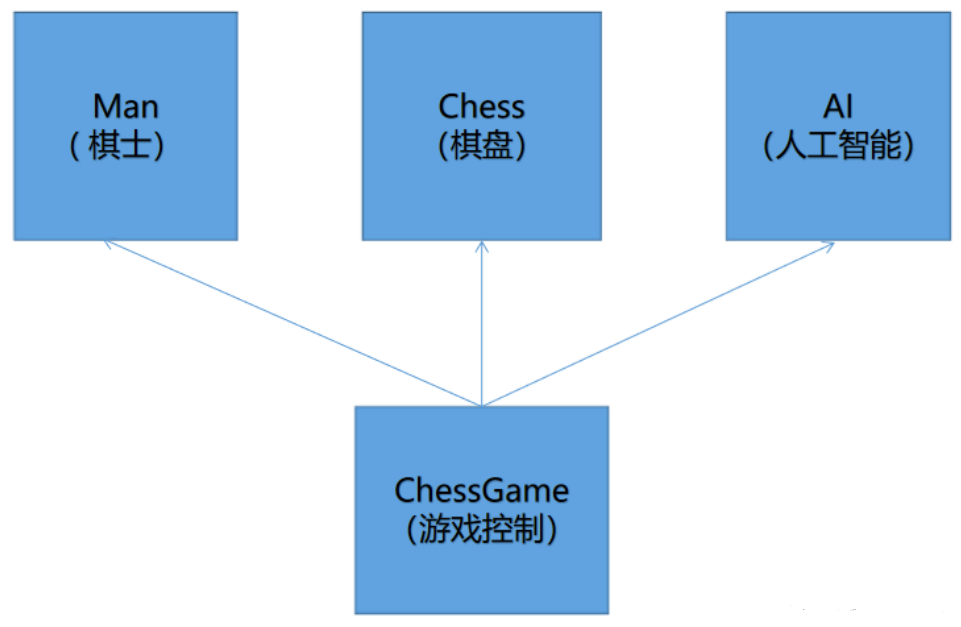
1、设计项目主体框架 首先先进行整体框架的设计,不写过程,直接写需要几个类!
2、给类添加主要接口 2.1 设计棋盘类Chess的主要接口 Chess.h1 2 3 4 5 6 7 8 9 10 11 12 13 14 15 16 17 18 19 20 21 22 23 24 25 26 27 28 29 30 31 32 33 34 35 36 37 38 39 40 41 42 43 44 45 46 47 48 49 50 51 52 53 54 55 56 57 58 59 60 61 #pragma once #define LEFT 5 #define TOP 5 #define RIGHT 19 #define DOWN 19 #define MAX_BORDER 25 #define CHESS_SIZE 15 #define GRID_SIZE 30 #define WIDTH GRID_SIZE*(CHESS_SIZE+1) #define HEIGHT GRID_SIZE*(CHESS_SIZE+1) #define MOUSE_P1 10 #define MOUSE_P2 20 #define MOUSE_COLOR LIGHTGRAY #define BACKGROUND_COLOR DARKGRAY #define BLACK_CHESS_COLOR 0 #define WHITE_CHESS_COLOR 0xFFFFFF typedef enum { EMPTY = 0 , Black_Chess = 1 , White_Chess = 2 } Object; class Chess_Position { public : int row; int col; Chess_Position (int r = 0 , int c = 0 ):row (r), col (c) {}; }; class Chess { public : void Draw_ChessBoard () void Show_Side_ChessColor (Object humanSide) void Init_Chess (Object humanSide) void Show_A_Chess (int x, int y, int color) void Show_Dialog (char * dialog) void Show_Result (bool humanWin) };
2.2 设计AI类的主要接口 AI.h1 2 3 4 5 6 7 8 9 10 11 12 13 14 15 16 17 18 19 #pragma once #include <vector> #include "Chess.h" using namespace std;class AI { public : void Init (Chess* chess) void AISearch (Object aiSide, Chess_Position& Position, Chess_Position& nextPosition) bool Is_Win (const Chess_Position Position, Object side) };
注意 :在最初开发时AISearch() 和Is_Win() 我并未输入参数,因为设计时并不知道要使用多少参数,这里为了方便我就直接复制进来了。
2.3 设计Man类的主要接口 Man.h1 2 3 4 5 6 7 8 9 10 11 12 13 14 15 16 17 18 #pragma once #include "Chess.h" class Man { public : void Init (Chess* chess) void Show_Mouse (int x, int y, int color) void Move_Mouse (int x, int y, int nx, int ny) void human_go (Chess_Position& Position, Object side) };
2.4 设计ChessGame的主要接口 ChessGame.h
1 2 3 4 5 6 7 8 9 10 11 12 13 14 15 16 #pragma once #include "Man.h" #include "AI.h" #include "Chess.h" #define compSide 0 class ChessGame { public : void play () };
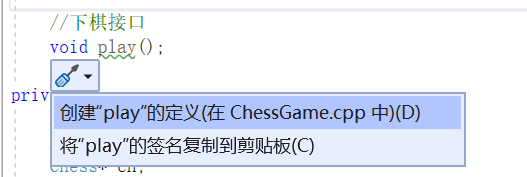
2.5 添加各个接口的具体实现 可以使用如下方式自动生成各接口的具体实现。先不用考虑各个接口的真正实现,直接使用空函数体代替。
3、绘制界面
这里绘制界面用到的是C++的图形库EasyX ,需要自行安装才能使用。
3.1 画出棋盘网络并进行初始化 Chess.cpp
1 2 3 4 5 6 7 8 9 10 11 12 13 14 15 16 17 18 19 20 void Chess::Draw_ChessBoard () for (int i = 1 ; i <= CHESS_SIZE; ++i) line (GRID_SIZE, i * GRID_SIZE, CHESS_SIZE * GRID_SIZE, i * GRID_SIZE); for (int i = 1 ; i <= CHESS_SIZE; ++i) line (i * GRID_SIZE, GRID_SIZE, i * GRID_SIZE, CHESS_SIZE * GRID_SIZE); } void Chess::Init_Chess (Object humanSide) initgraph (WIDTH, HEIGHT); setbkcolor (BACKGROUND_COLOR); cleardevice (); FlushMouseMsgBuffer (); Draw_ChessBoard (); Show_Side_ChessColor (humanSide); Show_Side_ChessColor (humanSide); }
再补充一下头文件
1 2 #include "Chess.h" #include <graphics.h>
3.2 显示用户提示会话以及胜负结果 1 2 3 4 5 6 7 8 9 10 11 12 13 14 15 16 17 18 19 20 21 22 23 24 25 26 27 void Chess::Show_Side_ChessColor (Object humanSide) settextstyle (18 , 0 , _T("楷体" )); outtextxy (WIDTH - GRID_SIZE * 6 , 6 , _T(humanSide == Black_Chess ? "AI:白 人:黑" : "AI:黑 人:白" )); } void Chess::Show_Dialog (char * dialog) settextstyle (20 , 0 , _T("Consolas" )); outtextxy (30 , 5 , _T(dialog)); } void Chess::Show_Result (bool humanWin) settextstyle (30 , 0 , _T("楷体" )); if (humanWin) { setcolor (RED); outtextxy (WIDTH / 2 - GRID_SIZE * 2 , 0 , _T("你赢了!" )); } else { setcolor (GREEN); outtextxy (WIDTH / 2 - GRID_SIZE * 2 , 0 , _T("你输了!" )); } }
3.3 绘制棋子 1 2 3 4 5 6 7 8 9 10 void Chess::Show_A_Chess (int x, int y, int color) x -= LEFT - 1 , y -= TOP - 1 ; x *= GRID_SIZE, y *= GRID_SIZE; setcolor (color); setfillcolor (color); setfillstyle (BS_SOLID); fillcircle (x, y, GRID_SIZE / 2 ); }
4、实现棋手走棋 4.1 棋手的初始化 为棋手类添加数据成员,表示棋盘
Man.h
实现棋手对象的初始化
Man.cpp
1 2 3 4 5 void Man::Init (Chess* chess) this ->ch = chess; }
在cpp文件中补充上头文件
Man.cpp
1 2 #include "Man.h" #include <graphics.h>
然后在ChessGame的构造函数中,实现棋手的初始化。
ChessGame.cpp
1 2 3 4 5 6 7 8 9 ChessGame::ChessGame (Man* man, AI* ai, Chess* chess) { this ->man = man; this ->ai = ai; this ->ch = chess; man->Init (chess); }
4.2 显示鼠标位置 为了用户能知道此时光标的位置,我们可以用四条斜线对光标位置进行定位,使用户能清晰地看到此时鼠标的位置。
1 2 3 4 5 6 7 8 9 10 void Man::Show_Mouse (int x, int y, int color) static const int p1[4 ][2 ] = { { MOUSE_P1 ,MOUSE_P1 },{ MOUSE_P1,-MOUSE_P1 },{ -MOUSE_P1,MOUSE_P1 },{ -MOUSE_P1,-MOUSE_P1 } }; static const int p2[4 ][2 ] = { { MOUSE_P2 ,MOUSE_P2 },{ MOUSE_P2,-MOUSE_P2 },{ -MOUSE_P2,MOUSE_P2 },{ -MOUSE_P2,-MOUSE_P2 } }; setlinecolor (color); x *= GRID_SIZE, y *= GRID_SIZE; for (int i = 0 ; i < 4 ; ++i) line (x + p1[i][0 ], y + p1[i][1 ], x + p2[i][0 ], y + p2[i][1 ]); }
我们知道用户的鼠标应该要进行实时的更新,因此我们需要在添加一个函数在用户移动鼠标时更新界面。
1 2 3 4 5 6 void Man::Move_Mouse (int x, int y, int nx, int ny) Show_Mouse (x, y, BACKGROUND_COLOR); Show_Mouse (nx, ny, MOUSE_COLOR); }
4.3 棋手走棋 1 2 3 4 5 6 7 8 9 10 11 12 13 14 15 16 17 18 19 20 21 22 23 24 25 26 27 28 29 30 void Man::human_go (Chess_Position& position, Object side) MOUSEMSG m; int nowx = -1 , nowy = -1 ; while (1 ) { m = GetMouseMsg (); int windowx = (m.x + (GRID_SIZE >> 1 )) / GRID_SIZE; int windowy = (m.y + (GRID_SIZE >> 1 )) / GRID_SIZE; int chessx = windowx + LEFT - 1 ; int chessy = windowy + TOP - 1 ; if (chessx >= LEFT && chessx <= RIGHT && chessy >= TOP && chessy <= DOWN) { switch (m.uMsg) { case WM_MOUSEMOVE: if (nowx != windowx || nowy != windowy) Move_Mouse (nowx, nowy, windowx, windowy); break ; case WM_LBUTTONDOWN: if (chess[chessy][chessx] != EMPTY) break ; ch->Show_A_Chess (chessx, chessy, side == Black_Chess ? BLACK_CHESS_COLOR : WHITE_CHESS_COLOR); position = { chessy ,chessx }; return ; } nowx = windowx, nowy = windowy; } } }
5、添加数据成员 为了便于调用各个类的功能,在ChessGame中,添加3个数据成员,并在构造函数中初始化这三个数据成员。
ChessGame.h
1 2 3 4 5 6 7 8 9 10 11 12 13 14 15 16 17 18 19 20 21 22 23 #pragma once #include "Man.h" #include "AI.h" #include "Chess.h" #define compSide 0 class ChessGame { public : ChessGame (Man*, AI*, Chess*); void play () private : Man* man; AI* ai; Chess* ch; };
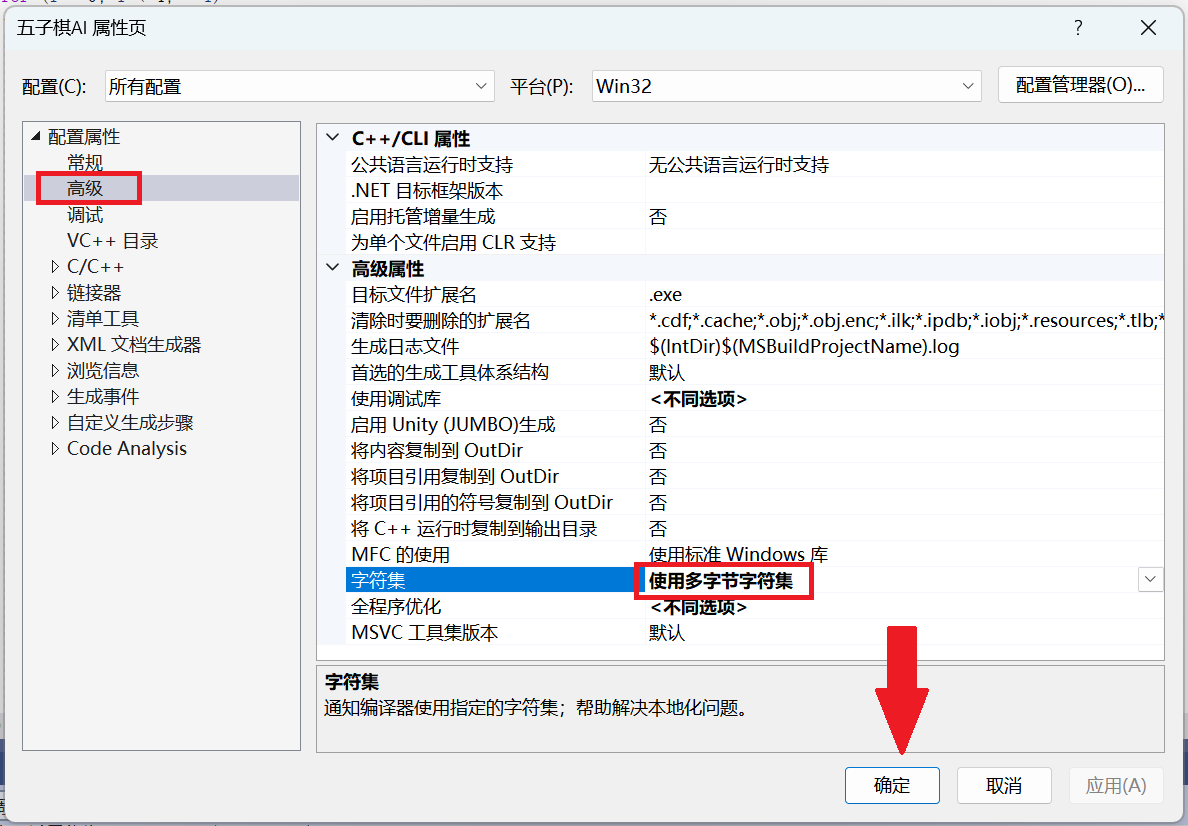
6、细节修改 修改项目的字符集为“多字节字符集”,因为我们要让编译器不增加宏定义——UNICODE。(是否增加了宏定义UNICODE,会影响了一些Windows API的使用。)
至此,我们第一部分整体框架的设计已经结束了,简单实现了界面,但还没实现AI下棋部分,AI部分的算法包含了Min-Max算法和αβ剪枝算法的实现。下一篇将优先实现AI算法中最重要的一环:评估函数的实现。
下一篇:五子棋AI(二)